
What Does an Ethernet Switch Actually Do — And How Is It Different from a Router?
The Role of an Ethernet Switch in a Network
An Ethernet switch connects multiple devices inside the same local area network so they can exchange data directly. It reads the destination MAC address inside each data frame and forwards that frame only to the correct port — not to every device on the network.
This targeted forwarding is what separates a switch from an older hub. A hub broadcasts every packet to all connected devices, leaving them to sort out what belongs to them. A switch eliminates that waste. Each device gets only the traffic addressed to it, which means more available bandwidth for everyone and less unnecessary processing at each endpoint.
Picture a commercial building with 40 workstations, a bank of IP cameras, and several networked printers. Without a switch, every device would compete for the same shared line. Response times slow down as traffic builds up. With a switch, each device gets its own dedicated path, and the network simply scales as more devices join.
This is why switches operate at Layer 2 of the OSI model — the data link layer — handling traffic strictly within one local network segment. Companies like WINTOP, known as optical module manufacturers with over 21 years of infrastructure experience, have built their switch lines around exactly this kind of reliable, layer-level engineering.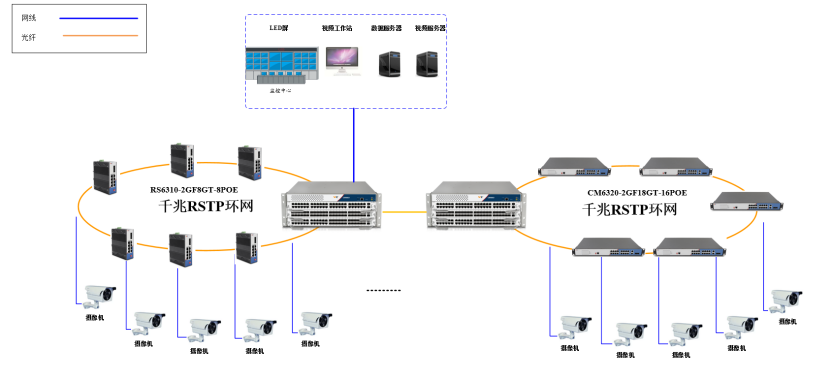
The Difference Between an Ethernet Switch and a Router
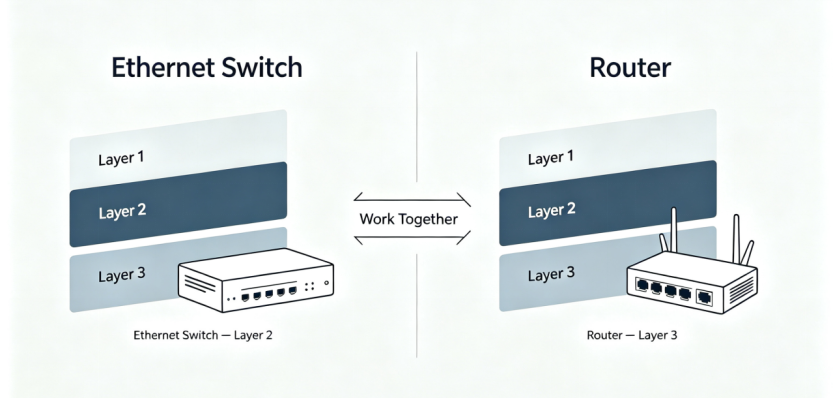
A switch creates a network. A router connects networks together. That single distinction explains almost every practical difference between the two devices.
Because a switch only manages traffic within one local network, it has no concept of "outside." It cannot connect your office to the internet by itself. A router sits at the network's edge and decides how data moves between separate networks — for example, between your office LAN and the internet.
This happens because the two devices work at different OSI layers. A switch operates at Layer 2, forwarding frames by MAC address. A router operates at Layer 3, routing packets by IP address. A MAC address identifies a physical device on a local segment; an IP address identifies a logical destination that can exist anywhere across interconnected networks.
Feature | Ethernet Switch | Router |
OSI Layer | Layer 2 (Data Link) | Layer 3 (Network) |
Primary job | Connects devices within one LAN | Connects separate networks |
Addressing used | MAC address | IP address |
Typical port count | High (8–48+) | Low (often 1–2 WAN ports) |
Internet access | No, by itself | Yes |
A common source of confusion is the "Layer 3 switch" — a managed switch that adds IP routing capability on top of standard Layer 2 switching. This is useful in large campus or industrial networks where traffic needs to move between multiple internal VLANs without going through a dedicated router. But for most straightforward deployments, the roles remain separate: the switch handles dense local connections, and the router manages traffic leaving the building.
Once that distinction is clear, the real question becomes: what kind of switch does your specific deployment actually need?
Key Factors to Consider When Choosing an Ethernet Switch
Not all switches are built for the same job. Three variables tend to drive the selection decision: port speed, environmental durability, and management capability. Each one maps directly to a different set of deployment risks. Getting all three right is what separates a switch that fits the job from one that just fills a rack space.
1. Port Speed and Bandwidth Requirements
Port speed determines how much data each connected device can send or receive at once. Most modern deployments call for Gigabit-rated ports (10/100/1000 Mbps), because IP cameras, wireless access points, and edge sensors generate far more traffic than older 100 Mbps Fast Ethernet ports were designed to handle.
Beyond individual port speed, backplane bandwidth sets the true ceiling — it defines how much total traffic the switch can move across all ports simultaneously. A switch with Gigabit ports but a constrained backplane will still bottleneck under peak load.
Fiber SFP uplink ports further extend reach between buildings or floors without signal degradation over longer cable runs. WINTOP's CM6328-2GF26GT pairs 26 Gigabit copper ports with 2 Gigabit SFP fiber ports and a 56 Gbps switching backplane — enough aggregate capacity to handle dense edge deployments without uplink bottlenecks.
2. Management Capabilities and Network Control
Management capability defines the level of visibility and control available once the switch is deployed. An unmanaged switch is plug-and-play with no configuration needed — the right fit for simple, low-risk edge points where reliability matters more than flexibility.
A managed switch adds VLAN segmentation, traffic prioritization, ring redundancy, and remote monitoring via SNMP. These features become essential when different user groups share the same physical infrastructure, when uptime is a contractual requirement, or when a fault needs to be diagnosed remotely without sending a technician on site.
3. Environmental Durability for Field Deployment
Environmental durability matters the moment a switch leaves a climate-controlled server room. Substations, railway cabinets, outdoor surveillance poles, and traffic control enclosures expose hardware to wide temperature swings, vibration, dust, and electrical interference — conditions that standard commercial hardware is simply not rated for.
A typical commercial-grade desktop switch operates between 0°C and 40°C with no shock or vibration certification. That is adequate for an office, but a liability bolted to a highway gantry in winter or installed inside a substation cabinet.
A purpose-built rugged Ethernet switch like the RS232-1GF1GT addresses this directly: a -40°C to 85°C operating range, an IP40-rated aluminum enclosure, dual redundant DC power input, and Level 4 EMC protection against surge and electrostatic discharge — all validated under IEC standards for vibration, shock, and free-fall.
Identifying where a deployment sits across all three axes — speed, control, and environment — is what turns a vague hardware requirement into a precise specification.
WINTOP's Ethernet Switch Lineup: Built Around Speed, Control, and Environment
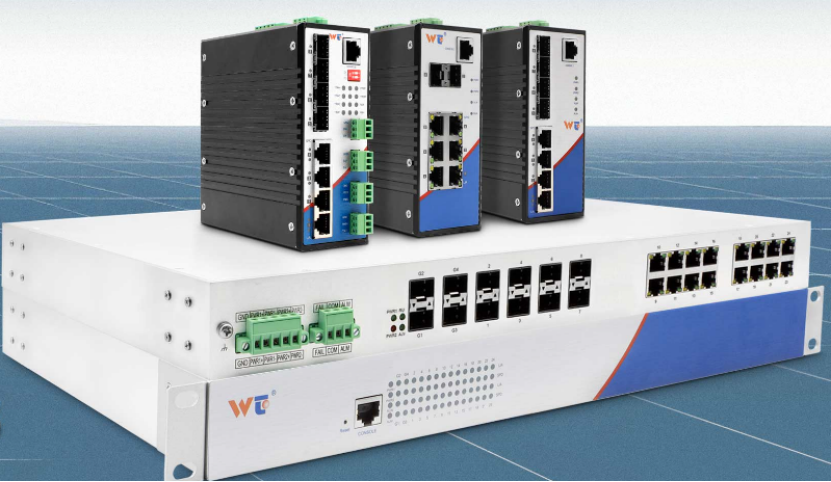
WINTOP designs its product lineup specifically around the three variables above. Every model targets a defined deployment scenario, and the full range is CE, UL, and RoHS certified.
The catalog covers four main categories:
Layer 2 Managed PoE Switch — for camera-heavy and access-point-dense networks that need VLANs, ring protection, and remote configuration
Layer 2 Managed Switch — full management features without PoE, for cost-sensitive managed deployments
Smart Dial Switch / Smart Dial PoE Switch — simplified configuration via physical dial switches, reducing on-site setup time; the CM2328-2GF26GT-24POE is a representative model here, offering 24 Gigabit PoE ports plus 2 Gigabit SFP fiber uplinks in a rack-mounted IP30-rated metal enclosure
Unmanaged Switch — plug-and-play, extended-temperature models for the simplest and harshest edge points
The Smart Dial category is worth noting for integrators managing multi-site rollouts. Physical dial-based VLAN and port configuration reduces dependency on laptop access or CLI knowledge during installation — a practical advantage when deploying across dozens of remote cabinets.
Switch Model | Category | Key Spec | Best Fit |
CM6328-2GF26GT | Layer 2 Managed | 26GE + 2 SFP, 56 Gbps backplane | Managed LAN aggregation |
CM2328-2GF26GT-24POE | Smart Dial PoE | 24 PoE + 2 SFP, dial-based config | Camera networks, simplified setup |
RS232-1GF1GT | Unmanaged | -40°C to 85°C, IP40, dual DC power | Industrial and outdoor sites |
WINTOP also supports OEM and ODM customization, allowing distributors and system integrators to adapt hardware or firmware to project-specific requirements across any of these categories.
Conclusion: Match the Switch to the Environment, Not Just the Port Count
Understanding what a switch does — and how it differs from a router — is the foundation. But the real work is matching the right switch to the actual deployment: the traffic volume it needs to carry, the environment it will operate in, and the level of control the network demands.
Treating port count as the only selection criterion is one of the most common mistakes in network planning. A switch with the wrong temperature rating fails in the field. One with insufficient backplane bandwidth creates congestion even when every individual link appears healthy. And an unmanaged unit in a network that needs VLAN isolation leaves both performance and security gaps.
Port speed, environmental durability, and management capability are the three axes that define the right match. WINTOP's range of ethernet switch manufacturers products is built to cover all three — from managed PoE aggregation switches to certified industrial units for the most demanding field conditions.